At a Glance
Intel T-Series processors are lower-power variants of desktop CPUs designed around reduced power consumption and thermal output compared with their conventional counterparts. They are particularly common in compact business PCs because their lower thermal requirements work well within small enclosures.
From the Workshop
We’ve encountered T-Series processors repeatedly while working with compact ThinkCentre and similar business Mini PCs. They have become particularly interesting to us for home-lab systems because they offer a practical balance between performance, thermals and the constraints of a very small enclosure.
RELATED KNOWLEDGE
T-Series vs Non-T Intel CPUs: What Makes T-Series Processors Useful for Mini PCs and Home Labs?
- Beginner
- 22/08/2026
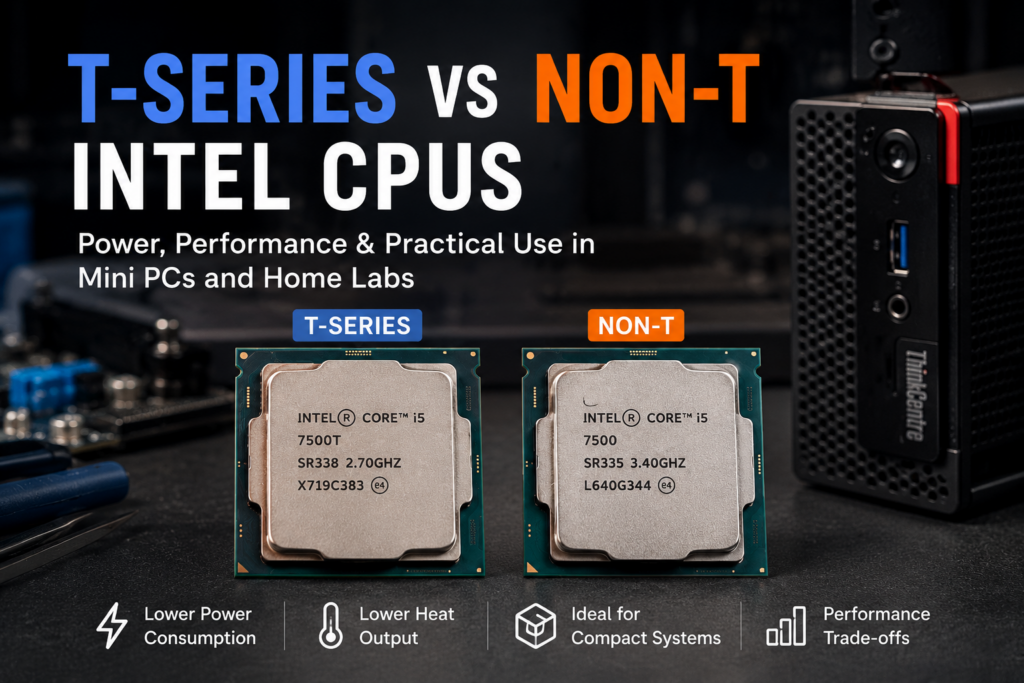
What Is an Intel T-Series CPU?
Intel has used the T suffix on a number of desktop processors to identify models designed around lower power consumption and thermal output than their conventional desktop counterparts.
For example, the Core i5-7500T is a lower-power member of the same generation as the Core i5-7500.
The important point is that the T suffix isn’t simply a performance rating. It represents a different power and thermal target, which can make these processors particularly interesting in compact computers.
This is one reason T-Series processors appear frequently in business Mini PCs such as Lenovo ThinkCentre Tiny systems.
T-Series vs Non-T
The easiest way to understand the difference is to look at the processor as part of a complete system.
| Characteristic | T-Series | Non-T Desktop |
|---|---|---|
| Power target | Lower | Higher |
| Thermal output | Generally lower | Generally higher |
| Compact systems | Very suitable | Depends on system |
| Cooling requirements | Usually easier to manage | Can require more cooling |
| Performance | Often lower at sustained loads | Generally higher |
| Home-lab suitability | Very good for many workloads | Good when performance is priority |
The exact specifications vary between generations, so the suffix should not be treated as a universal performance rule.
When comparing two CPUs, it is still important to look at their actual specifications rather than assuming every T-Series processor behaves identically.
Why Are T-Series CPUs Common in Mini PCs?
Compact computers have a very different thermal environment from conventional desktop PCs.
A Mini PC has considerably less physical space for:
- heatsinks
- fans
- airflow
- power delivery
- expansion hardware
Reducing the amount of heat generated by the processor makes it easier to design a compact system that can operate reliably without requiring a large cooling solution.
This is particularly useful for business computers that may need to remain small enough to mount behind a monitor, under a desk or in other space-constrained environments.
That is one reason T-Series processors are so common in systems such as ThinkCentre Tiny and other compact business PCs.
Why Does This Matter for a Home Lab?
A home lab often has very different requirements from a gaming or workstation PC.
Instead of maximum performance for short periods, you may care more about:
- running continuously
- reasonable idle power
- thermal behaviour
- physical size
- noise
- reliability
- multiple systems operating in the same space
A Mini PC equipped with a T-Series processor can therefore make a useful foundation for workloads such as:
- Home Assistant
- file sharing
- lightweight servers
- Docker containers
- network services
- monitoring
- development environments
- small databases
- testing and experimentation
The right processor still depends on the workload. A T-Series CPU isn’t automatically the best choice for every home-lab application.
T-Series Does Not Mean “Server CPU”
This is an important distinction.
The T suffix doesn’t mean that the processor was specifically designed as a server processor.
Many T-Series chips are desktop CPUs designed for systems where lower power and thermal requirements are desirable.
A home lab can make excellent use of one, but that doesn’t turn the CPU into an enterprise server processor.
For larger workloads, virtualization requirements, high core counts or other demanding applications, a different processor may make more sense.
T-Series vs Non-T: Which Should You Choose?
There isn’t a universal winner.
Choose T-Series when:
- you are building around a compact Mini PC
- thermal constraints matter
- lower power consumption is desirable
- your workload doesn’t require maximum CPU performance
- you want a small always-on system
Consider Non-T when:
- performance is more important than size
- the system has adequate cooling
- sustained CPU workloads are expected
- power consumption is less important
- you’re working with a larger desktop or SFF system
For many small home-lab machines, T-Series processors provide a sensible balance rather than simply being a compromise.
An Example From the Workshop
We’ve worked with several generations of compact business systems where T-Series processors are particularly useful.
For example, processors such as the i3-7100T, i5-6500T, i5-7500T and i5-7600T fit naturally into the kind of compact systems we work with at BWS Works.
The interesting part isn’t simply that these processors consume less power.
It’s the combination of:
CPU + compact enclosure + cooling + storage + networking + intended workload
that makes the platform useful for a home lab.
A processor that looks modest on a specification sheet can become a surprisingly capable machine when the workload is chosen appropriately.
What Should You Check Before Buying One?
If you’re considering a T-Series processor for a Mini PC or home-lab project, don’t look at the CPU in isolation.
Check:
1. Socket compatibility
Make sure the processor is compatible with the motherboard and platform.
2. BIOS support
Older systems may require a particular BIOS version to support certain processors.
3. Cooling
A T-Series CPU still produces heat. Compact systems need appropriate cooling just like larger computers.
4. RAM compatibility
The processor generation determines the memory technology supported by the platform.
5. Workload
Consider what the machine will actually do before choosing the processor.
A lightweight NAS and a virtualisation host may have very different CPU requirements.
The Bigger Picture
One of the interesting things about older business Mini PCs is that their original purpose doesn’t necessarily define their second life.
A machine designed for office computing can become:
a home server,
a monitoring node,
a media machine,
a development box,
or simply an inexpensive platform for experimentation.
T-Series processors are one of the pieces that make many of these compact systems practical for that kind of reuse.